Why Google Ads Conversion Tracking Matters (And How to Set It Up)
Many businesses run ads.
But very few track conversions properly.
Without conversion tracking, you’re not optimizing —
You’re guessing.
If you want profitable campaigns, conversion tracking is non-negotiable.
🔎 Why Conversion Tracking Is Important
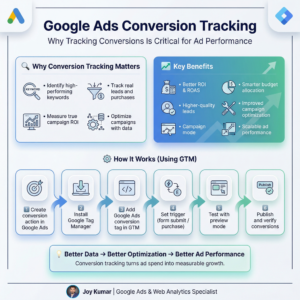
When you track conversions, you can see:
• Which keywords drive leads or sales
• Which ads actually convert
• Which campaigns deserve more budget
• Your real Cost Per Conversion (CPA)
Without this data:
❌ You waste ad budget
❌ You optimize blindly
❌ You scale the wrong campaigns
Data is what turns advertising into a growth system.
📈 Benefits of Proper Conversion Tracking
When conversion tracking is set up correctly:
✅ Google’s algorithm optimizes for real customers
✅ You can improve ROI and ROAS
✅ You identify high-performing keywords & audiences
✅ You scale campaigns with confidence
Better data → Better optimization → Better results.
⚙️ How To Set Up Google Ads Conversion Tracking (Using GTM)
A common professional setup uses Google Tag Manager.
Basic process:
1️⃣ Create a conversion action in Google Ads
2️⃣ Install Google Tag Manager on the website
3️⃣ Add the Google Ads Conversion Tag in GTM
4️⃣ Set the correct trigger (form submit, purchase, lead, etc.)
5️⃣ Test using Tag Assistant / Preview mode
6️⃣ Publish the container and verify conversions in Google Ads
This ensures accurate tracking without changing website code repeatedly.
💡 Final Thought
Running ads without conversion tracking is like driving with your eyes closed.
Once proper tracking is implemented,
Google Ads becomes predictable, scalable, and profitable.
💬 Are you currently tracking all your important conversions in Google Ads?